Tree Shape Brush Stamps for Procreate
Digital illustration has evolved rapidly, offering tools that bridge the gap between traditional artistry and modern efficiency. Among these tools, specialized brush sets have become indispensable for creators who want to maintain a hand-drawn aesthetic without spending hours on repetitive details. The Tree Shape Brush Stamps collection is designed precisely for this purpose. It offers a curated set of twenty-two unique tree silhouettes that allow you to populate your digital canvases with lush, organic elements in seconds. Whether you are designing a whimsical greeting card or drafting a complex landscape background, these stamps provide the versatility and speed needed to keep your creative flow uninterrupted.
Understanding the Value of Digital Stamp Brushes
For many artists, especially those new to digital platforms like Procreate, the idea of using "stamps" might seem like cheating. However, professional illustrators and designers use them extensively to save time on elements that do not require unique, one-off attention. A tree in the background of a scene serves a compositional purpose, but drawing every leaf and branch individually can be tedious. This is where the procreate brush stamp functionality shines. These brushes are pre-rendered shapes that behave like standard painting tools. When you tap or swipe across your screen, they deposit a high-quality tree image that blends seamlessly with your other layers.
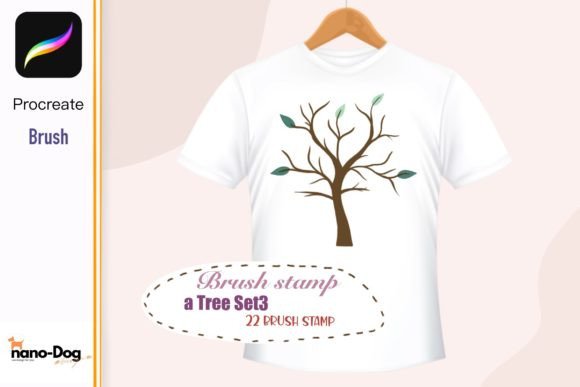
The primary appeal of this specific set lies in its variety. With twenty-two different shapes, you avoid the robotic look that comes from repeating a single asset. You get deciduous trees, conifers, sparse winter branches, and full summer canopies. This diversity allows for natural-looking forests and varied landscapes. Furthermore, because these are digital files, they are infinitely scalable. You can shrink a tree to fit a tiny sticker design or enlarge it for a large-format wall art print without losing clarity, provided you work at a sufficient resolution.
Practical Applications for Creators and Entrepreneurs
The utility of these brushes extends far beyond simple landscape painting. For small business owners and entrepreneurs, particularly those in the print-on-demand sector, speed is currency. Imagine you are creating a design for a line of eco-friendly T-shirts. Instead of commissioning a custom illustration for every variant, you can use these Tree Shape Brush Stamps to quickly assemble unique compositions. You might combine a few different tree shapes, adjust their opacity, and add some text to create a best-selling graphic in minutes rather than days.
Consider the world of stationery and paper goods. Designers who create wedding invitations, birthday cards, or packaging tags often need subtle, nature-inspired borders or accents. These brushes allow for rapid prototyping. You can test different arrangements of trees along the edge of a card design, changing colors and sizes instantly to match the client’s theme. The same logic applies to home decor items like mugs and pillows. A simple, elegant row of pine trees can transform a plain white mug into a cozy winter product. Because the download includes clean digital files without watermarks or shadows, the resulting designs are ready for commercial printing immediately.
Educators and content creators also find value in these tools. If you are making educational materials about nature, biology, or environmental science, having quick access to accurate tree silhouettes helps in creating engaging visuals for presentations or worksheets. Bloggers and marketers can use them to create eye-catching social media graphics that stand out in a feed cluttered with stock photography. The hand-drawn feel adds a personal touch that resonates well with audiences looking for authenticity.
How to Integrate These Brushes into Your Workflow
Getting started with this tool is straightforward, but understanding the technical requirements ensures a smooth experience. This product is an instant digital download, meaning there is no physical shipping involved. Once you purchase the file, you will receive a ZIP archive containing the necessary .brush file. It is crucial to note that these brushes are exclusively compatible with the Procreate app on the iPad. They will not work with Photoshop, Illustrator, or other desktop software unless you convert the individual stamps into PNGs first, which defeats the purpose of the brush format.
To install the brushes, simply download the ZIP file to your iPad. Tap on the file to unzip it, then select the .brush file. It should automatically open in Procreate and import itself into your current brush library. If it does not open automatically, you can manually import it by tapping the plus sign in any brush set within Procreate and selecting "Import." Before you begin, ensure your Procreate app is updated to the latest version. Older versions may not support the newer brush engine features used in these stamps, leading to import errors or unexpected behavior.
Once installed, your palette is ready to use. Select the brush set, choose a color, and start painting. Remember that these are stamps, so each tap places a complete tree. To create depth, vary the size and opacity of your strokes. Use darker greens for foreground trees and lighter, desaturated tones for those in the distance. This technique, known as atmospheric perspective, adds realism to your digital scenes.
Important Considerations for Best Results
While these tools are powerful, there are a few things to keep in mind to maximize their potential. First, always check the resolution of your canvas. If you are designing for large-format prints like wall art, start with a high DPI (dots per inch) setting. While vector graphics are infinitely scalable, raster brushes like these depend on pixel density. Working at a high resolution ensures that your tree edges remain crisp even when printed large.
Second, respect the licensing and usage rights. Since this is a digital product intended for both personal and commercial use, you can incorporate the resulting artwork into products you sell, such as stickers, tags, and packaging. However, you cannot resell the brush file itself or claim the raw stamp assets as your own original clipart. Always read the specific license agreement included with your download to stay compliant.
Finally, experiment with blending modes. In Procreate, changing a layer’s blending mode from "Normal" to "Multiply" or "Overlay" can help your tree stamps integrate more naturally with textured backgrounds. This simple adjustment can make a stamped tree look like it was painted directly onto paper or fabric, enhancing the overall professionalism of your design. By combining these technical tips with the creative freedom offered by the twenty-two unique shapes, you can elevate your digital artistry efficiently and enjoyably.